
When it comes to writing, your keyboard is not just a tool; it’s your partner in creativity, the pipe through which you turn your ideas into words.
Every writer looks for comfort, but finding the right keyboard for writing involves more than just comfort. There is a checklist of things that you should look into while finding the most compatible keyboard for you.
- Do you need a wireless or a wired keyboard?
- Do you prefer a silenced typing experience or a more click-and-clack satisfying feeling?
- Do you like the design and layout of the buttons?
- What kind of budget do you have?
These are some of the few simple questions that you should have prior to checking out the keyboard you’ve added to your cart.
Whether you’re writing an essay, an e-book, or a research paper, here are my top five recommendations for the best external keyboard for writers.
DISCLOSURE: This post may contain affiliate links, meaning when you click the links and make a purchase, we receive a commission at no cost to you.
TL;DR: Top Keyboards for Writing
- Logitech MK270 – A budget-friendly full-size wireless keyboard with a number pad, hotkeys, and a bundled mouse. Great for home office use, but a bit loud when typing.
- Arteck 2.4G – Ultra-slim, lightweight, and rechargeable, perfect for travel or shared spaces. Quiet scissors keys make typing smooth, though Mac compatibility is limited.
- Logitech K400 Plus – Comes with a built-in touchpad, making it great for laptops and smart TVs. Compact and convenient, but the tight layout and lack of Bluetooth are drawbacks.
- Macally Wireless Keyboard – Ergonomic with a wrist rest and tilt adjustment, it’s designed for comfort during long typing sessions. Compatible across devices, but lacks Bluetooth.
- iClever Wireless Keyboard – Sleek, slim, and Bluetooth-enabled. Offers quiet, comfortable typing. Ideal for Mac users and writers on the go, but it isn’t backlit.
5 Best Lightweight and Portable Keyboards for Writers
1. Logitech MK270
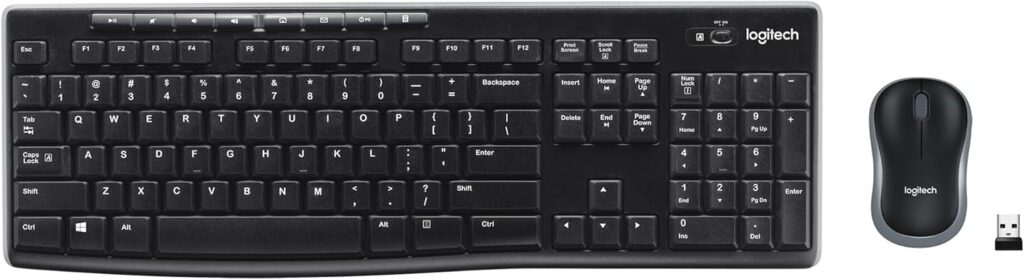
If you’re looking for a reliable keyboard without breaking the bank, the Logitech MK270 is a solid choice. It’s built to make your workflow smoother and comes with all the essentials you’d expect from a functional everyday keyboard.
Key features
- Full layout with hotkeys – includes a number pad and dedicated shortcuts for faster tasks.
- Decent key feel – responsive to the touch, though typing noise can be loud.
- Mouse included – comes as a combo set, so no need to buy an extra mouse.
- Easy setup – just plug in the USB adapter and start typing.
Why I recommend Logitech MK270?
For me, this keyboard works best in a home office setting. I’ve been using this version for years with my laptop. The typing noise can be distracting in public spaces, but if you don’t mind the click-and-clack, it feels just fine. I also like how the design keeps everything within reach. No need to stretch my fingers across the board.
The real bonus is the mouse combo. If I were on a tight budget and needed something functional, this would be my go-to. It’s not premium, but for new writers or anyone starting out, the MK270 gets the job done without extra cost or fuss, making it one of the more affordable keyboards for writers on a budget.
Pros
- Comes with a numerical pad
- Affordable price
- Easy installation
Cons
- Loud typing
- Cheap look and feel
2. Arteck 2.4G
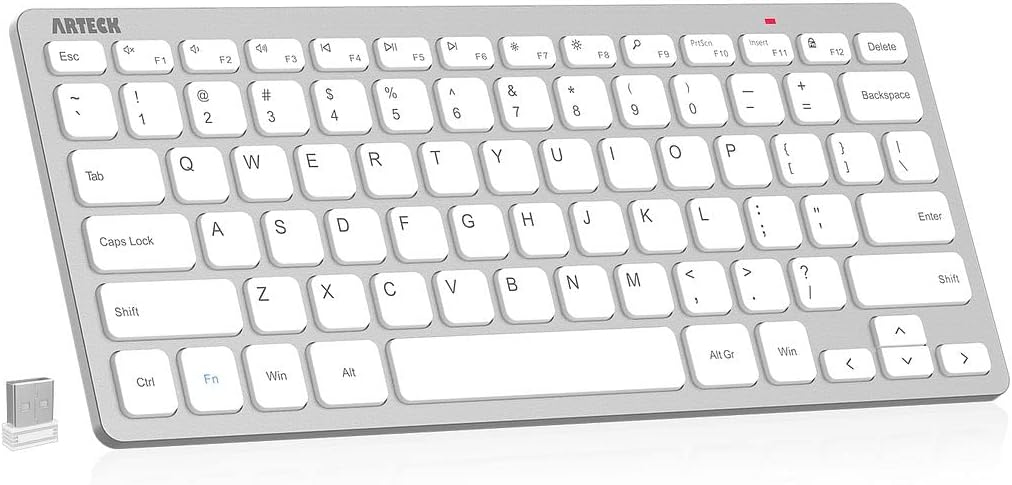
Not a fan of bulky traditional keyboards? The Arteck 2.4G could be the perfect fit. Ultra-slim, lightweight, and compact, it’s one of the most portable keyboards for writers who need a sleek and efficient solution. Ideal for travellers, digital nomads, and remote workers, this keyboard offers a convenient setup wherever you go.
Key Features
- Ultra-slim & compact design – saves desk space and easy to carry around.
- Smooth, quiet typing – scissors-x structure provides comfort and reduces noise.
- Rechargeable battery – 3–5 hour charge with energy-saving mode for longer use.
- Comfortable wrist angle – designed to avoid extra strain during long typing sessions.
- Easy setup – plug-and-play with a nano USB receiver.
Why I recommend Arteck 2.4G?
Typing on the Arteck 2.4G feels smooth and quiet, which makes it great for shared spaces or late-night writing. I like how compact it is, giving me more room to move my fingers without feeling cramped, even on smaller desks. If you’re working in shared spaces, you can pair a quiet keyboard like the Arteck 2.4G with quality headphones for remote work to create your perfect writing environment.
The rechargeable battery is also a plus, especially with its energy-saving mode that kicks in during breaks. I found the wrist angle comfortable enough for long sessions, so it doesn’t put too much pressure on my hands.
As a MacBook user, I noticed some limitations in functionality, since it’s built primarily for Windows systems. The key layout takes a little time to get used to, but once you adapt, it works well for writing tasks. Overall, it’s a solid option if portability and quiet typing are at the top of your list.
Pros
- Easy connectivity & installation
- Lightweight
- Quiet typing experience
Cons
- Limited function key compatibility when used with Mac
3. Logitech K400 Plus
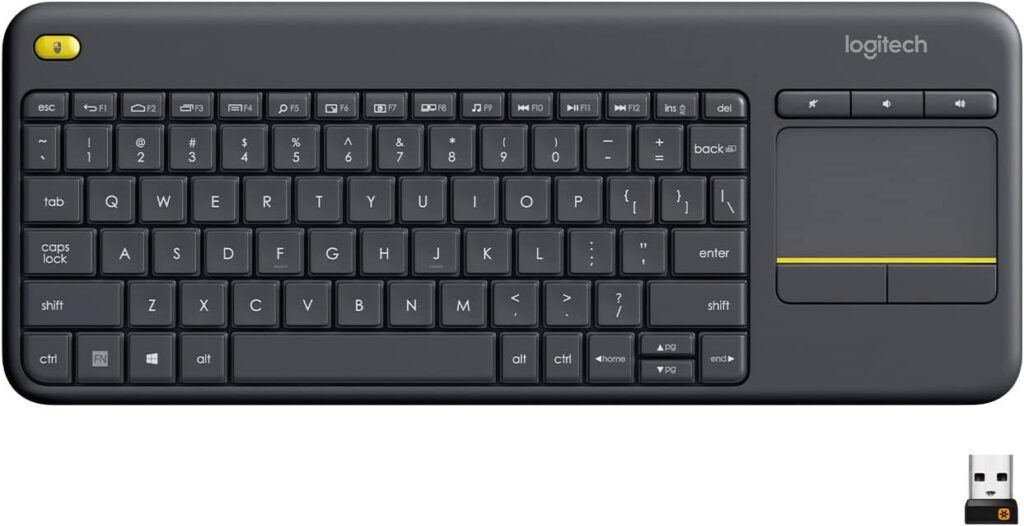
Next on my list is the Logitech K400 Plus, a lightweight wireless keyboard designed for laptops and smart TVs. While it’s marketed broadly, it works well as one of the keyboards for writers who prioritize portability. It’s smooth to type on, compact, and delivers an all-in-one solution without the hassle of carrying extra accessories
Key Features
- Built-in touchpad – includes a touchpad with mute and up/down control buttons.
- Flexible controls – the yellow button on the upper left can function as a left mouse click.
- Lightweight & portable – easy to carry around and quick to set up.
- Proprietary receiver – works only with Logitech’s receiver, not Bluetooth.
- Compact layout – saves space but has tighter key spacing, which may lead to typos.
Why I recommend Logitech K400 Plus?
What I like about the K400 Plus is the convenience of having a keyboard and touchpad in one device. I don’t need to worry about carrying a mouse, and the additional buttons give me flexibility in how I control my laptop or TV. It’s light, easy to set up, and practical for casual writing or office tasks.
That said, there are some trade-offs. The compact design means the keys are a bit too close together, which can lead to frequent typos, especially during long typing sessions. The lack of backlighting is another drawback if you’re working in dim environments, as I found myself squinting more than typing.
Overall, the K400 Plus serves its purpose well if you need a light, portable, and multifunctional keyboard. Just keep in mind it’s better suited for short bursts of work or media control rather than heavy writing marathons.
Pros
- Presence of touchpad
- Quiet typing noise
- Decent ergonomics
Cons
- Tight key layout
- No Bluetooth support
4. Macally Wireless Keyboard

Are you typing for long hours and need something to ease your wrists and fingers? The Macally Wireless Keyboard is designed with ergonomics in mind. With its supportive build and versatile compatibility, it’s a great option for writers, office workers, and anyone spending hours at the keyboard.
Key Features
- Ergonomic design – includes a wrist rest and adjustable kickstand for a comfortable typing angle.
- Wide compatibility – works with laptops, Windows PCs, desktops, Chromebooks, and MacBooks via USB receiver.
- Reliable performance – trusted even beyond its warranty period.
- Strong support – comes with a 2-year warranty and lifetime tech support.
- Full layout – includes a numeric keypad for quick calculations and smoother workflows.
Why I recommend Macally wireless keyboard?
What makes the Macally stand out for me is its comfort-focused design. The wrist rest and adjustable tilt really help reduce strain during long writing sessions, making it much easier on my hands compared to flat, compact keyboards.
I also like its reliability and support. Even after the warranty runs out, I’ve found it to stay consistent, and the promise of lifetime tech support is a big reassurance. Having a full number pad is another plus, especially when I need to do quick calculations without switching devices.
Overall, the Macally Wireless Keyboard is a dependable, ergonomic choice for anyone who values comfort, stability, and long-term support in their typing experience.
Pros
- Good typing experience
- Full-size and full-travel keyboard
- Light and portable
Cons
- No Bluetooth support
5. iClever Wireless Keyboard
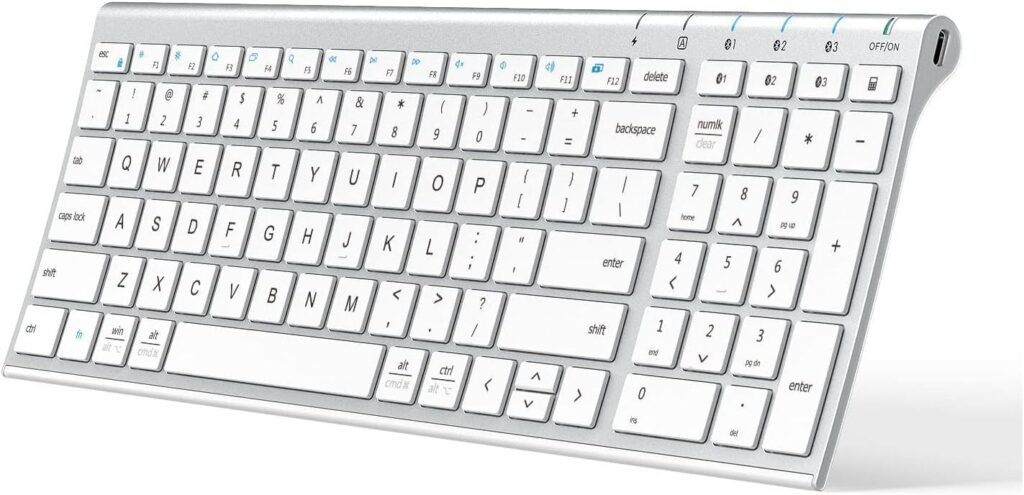
If you take a look at the iClever Wireless Keyboard, you’ll notice its slim and sleek design that resembles a MacBook. It’s modern, stylish, and built for convenience, with the ability to connect to multiple devices at once. This combination of aesthetics and functionality makes it one of the standout keyboards for writers who use MacBooks and want seamless device integration.
Key Features
- Multi-device connection – easily switch between Windows, Mac, iOS, and Android devices.
- Bluetooth connectivity – no USB dongle needed, making setup simple and clutter-free.
- Ergonomic design – slight slope and well-spaced keys for smooth, comfortable typing.
- Quiet scissors keys – offers soft, silent keystrokes ideal for long writing sessions.
- Slim and portable – compact build with a luxurious, modern look.
Why I recommend iClever wireless keyboard?
What I love about the iClever is its balance of style and function. It feels premium, looks sleek on the desk, and pairs effortlessly with all my devices through Bluetooth. There’s no need to carry around an extra receiver.
Typing is smooth and fluid, thanks to the ergonomic slope and spacing of the keys. The scissors switch mechanism makes it both comfortable and quiet, which means I can type in cafés, libraries, or shared spaces without annoying the people around me.
For me, the iClever stands out as a writer-friendly keyboard that combines portability, comfort, and elegance in one tool.
Pros
- Quiet and smooth typing
- Bluetooth connection
- Mac and & iOs friendly
Cons
- Keyboard is not backlit
How to choose the best keyboard for typing?
Choosing the best laptop keyboard for typing can be challenging when you don’t know which critical features to look for.
As a writer, I prefer to stick to simple use and practicality. I’d list down what works and what doesn’t work when it comes to typing in the long hours.
While we may take breaks from time to time, we often get caught up with work and tend to forget to give our hands a rest, especially when we have a flow of ideas running through our little fingers!
All I want is to write at ease while avoiding wrist pain and tired fingers. I believe that it’s a challenge that we, as writers, face from time to time.
So, below are some of the key features that you should definitely look into on how you can choose the best laptop keyboard for typing :
- Ergonomics – Ergonomic features are essential to consider as they will affect the long-term. Protect your wrists early before the pain catches you later on.
- Cost – It is wise to have a budget before purchasing a keyboard. There is a huge difference in price between excellent keyboards and cheap ones on the market.
- Wired or Wireless – I’d definitely recommend wireless for the most straightforward reason: It is easy to connect, and you don’t have to deal with ugly cables anymore.
- Keyboard Size – Compact or full size depends on your preferences and usage. Whether you’re working on a small or big desk, always on the go, or working from various places, the size will define the efficiency of your work.
- Design & Layout of Keys (Hotkeys and Media Keys) – Have a feel of how the design fits you better from one keyboard to another. Shortcuts are very, very important to facilitate your everyday tasks.
So, if you’re used to running your fingers for shortcuts to hotkeys and media keys, you’ll need to pick one that will not throw you off balance.
Final Thoughts
Working as a writer, the main thing when looking for a keyboard is that as long as you feel compatible and happy with it, that’s good enough.
Don’t be like me. I got confused when trying to find the perfect keyboard and ended up looking at its downside instead of its advantageous features.
Generally, most keyboards for writing are made to be practical and simple.
You don’t have to go deep into details and get overwhelmed with all the technical jargon!
I’d highly recommend considering putting ergonomics on a slightly higher priority. The reason is to reduce the stress you are putting on your wrists and hands, especially when you write and type for long hours.
It might take you a while to adjust to the various forms of ergonomic keyboards, but you’ll thank me later when you no longer have wrist pain.

Kenny freelances on Upwork and LinkedIn. Over the years, he has built a content writing business as an independent contractor. He's on a mission to help others get started in freelancing.
- Kenny Leehttps://gighustlelab.com/author/admin/

- Kenny Leehttps://gighustlelab.com/author/admin/

- Kenny Leehttps://gighustlelab.com/author/admin/

- Kenny Leehttps://gighustlelab.com/author/admin/
